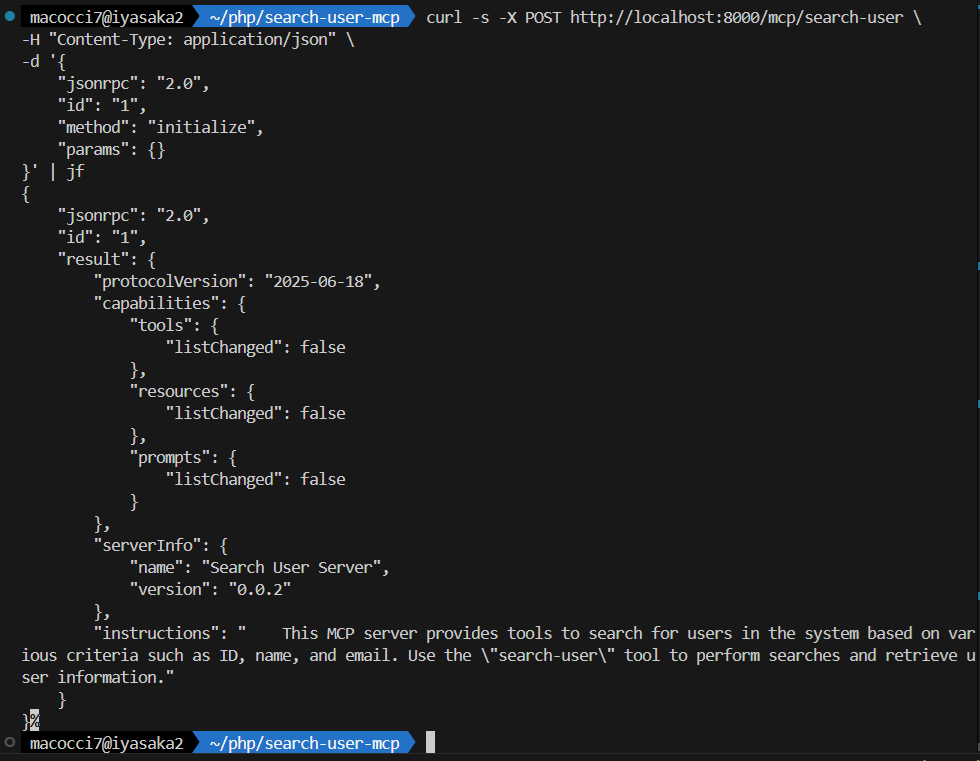
MCPインスペクターではなく、curlコマンドを使ってMCP(Model Context Protocol)サーバーの動作テストをする際に投げるJSONリクエストのメモです。
テスト対象のMCPサーバーとして、以前の記事で作成したユーザー検索MCPサーバーを使っていきます。

レスポンスJSONを見やすく整形するようにJSONフォーマッターを導入すると良いでしょう。

Model Context Protocolにおいて送受信されるJSONは、JSON-RPC 2.0に則っています。


initialize
initializeはMCPサーバーとの最初の接続で実行し、
MCPサーバーの基本情報を取得するメソッドです。
MCPサーバーへのリクエストは全てPOSTメソッドで行います。
POSTデータにリクエスト内容をJSONで記述します。
methodプロパティで「initialize」を指定すればOKです。
▼テストコマンドの例
curl -s -X POST http://localhost:8000/mcp/search-user \
-H "Content-Type: application/json" \
-d '{
    "jsonrpc": "2.0",
    "id": "1",
    "method": "initialize",
    "params": {}
}' | jf
▼実行結果
{
    "jsonrpc": "2.0",
    "id": "1",
    "result": {
        "protocolVersion": "2025-06-18",
        "capabilities": {
            "tools": {
                "listChanged": false
            },
            "resources": {
                "listChanged": false
            },
            "prompts": {
                "listChanged": false
            }
        },
        "serverInfo": {
            "name": "Search User Server",
            "version": "0.0.2"
        },
        "instructions": "    This MCP server provides tools to search for users in the system based on various criteria such as ID, name, and email. Use the \"search-user\" tool to perform searches and retrieve user information."
    }
}
APIキーでの認証が必要なMCPサーバーの場合は、ヘッダーで「Authorization」を追加してAPIキーを指定しておきましょう。
▼ヘッダーにAPIキーを指定する例
curl -s -X POST http://localhost:8000/mcp/search-user \
-H "Content-Type: application/json" \
-H "Authorization: Bearer github_pat_***" \
-d '{
    "jsonrpc": "2.0",
    "id": "1",
    "method": "initialize",
    "params": {}
}' | jf
tools/list
tools/list はMCPサーバーが提供しているtoolのリストを取得するメソッドです。
リストには各ツール毎の説明や入力パラメータのスキーマも含まれます。
methodプロパティに「tools/list」を指定すればOKです。
▼テストコマンドの例
curl -s -X POST http://localhost:8000/mcp/search-user \
-H "Content-Type: application/json" \
-d '{
    "jsonrpc": "2.0",
    "id": "1",
    "method": "tools/list",
    "params": {}
}' | jf
▼実行結果
{
    "jsonrpc": "2.0",
    "id": "1",
    "result": {
        "tools": [
            {
                "name": "search-user",
                "title": "Search User",
                "description": "This tool allows you to search for users in the system.",
                "inputSchema": {
                    "properties": {
                        "id": {
                            "description": "The ID of the user to search for.",
                            "type": "integer"
                        },
                        "name": {
                            "description": "The name of the user to search for.",
                            "type": "string"
                        },
                        "email": {
                            "description": "The email of the user to search for.",
                            "type": "string"
                        },
                        "logical-operator": {
                            "description": "The logical operator to combine search criteria.",
                            "enum": [
                                "AND",
                                "OR"
                            ],
                            "type": "string"
                        },
                        "per-page": {
                            "description": "The number of results to return per page (from 1 to 100).",
                            "default": 10,
                            "type": "integer"
                        },
                        "page": {
                            "description": "The page number of results to return.",
                            "default": 1,
                            "type": "integer"
                        }
                    },
                    "type": "object"
                },
                "annotations": []
            }
        ]
    }
}
tools/call
tools/call はツールの実行をリクエストするメソッドです。
methodプロパティで「tools/call」を指定します。
ツール名の指定はparams.nameプロパティで指定します。
入力パラメータは、params.argumentsプロパティ内で指定します。
▼テストコマンドの例
curl -s -X POST http://localhost:8000/mcp/search-user \
-H "Content-Type: application/json" \
-d '{
    "jsonrpc": "2.0",
    "id": "1",
    "method": "tools/call",
    "params": {
      "name": "search-user",
      "arguments": {
        "id": 1,
        "name": "h",
        "email": "h",
        "logical-operator": "OR",
        "per-page": 5,
        "page": 2
      }
    }
  }' | jf
▼実行結果
{
    "jsonrpc": "2.0",
    "id": "1",
    "result": {
        "content": [
            {
                "type": "text",
                "text": "{\n    \"status\": \"success\",\n    \"meta\": {\n        \"total\": 63,\n        \"per_page\": 5,\n        \"page\": 2,\n        \"last_page\": 13,\n        \"query\": {\n            \"id\": 1,\n            \"name\": \"h\",\n            \"email\": \"h\",\n            \"logical-operator\": \"OR\",\n            \"per-page\": 5,\n            \"page\": 2\n        }\n    },\n    \"data\": [\n        {\n            \"id\": 10,\n            \"name\": \"Colten Bernhard\",\n            \"email\": \"bmann@example.org\"\n        },\n        {\n            \"id\": 11,\n            \"name\": \"Prof. Elijah Bernier MD\",\n            \"email\": \"zpfannerstill@example.org\"\n        },\n        {\n            \"id\": 12,\n            \"name\": \"Ines Bayer\",\n            \"email\": \"richard08@example.net\"\n        },\n        {\n            \"id\": 13,\n            \"name\": \"Kristin Gulgowski\",\n            \"email\": \"smitchell@example.com\"\n        },\n        {\n            \"id\": 14,\n            \"name\": \"Alva Trantow\",\n            \"email\": \"sydney.reichert@example.com\"\n        }\n    ],\n    \"summary\": \"Found 63 users matching the criteria.\"\n}"
            }
        ],
        "isError": false
    }
}
「text: “{…}”」の {…} の箇所だけをJSON形式で抽出する場合は、次のPHPコードでいけます。
print_r(json_decode(file_get_contents("php://stdin"), true)["result"]["content"][0]["text"] ?? null);シェル関数に追加する場合は:「~/.zshrc」に追記
get-text() {
        php -r 'print_r(json_decode(file_get_contents("php://stdin"), true)["result"]["content"][0]["text"] ?? null);'
}
▼「text: “{…}”」の内容だけを抽出する例
curl -s -X POST http://localhost:8000/mcp/search-user \
-H "Content-Type: application/json" \
-d '{
    "jsonrpc": "2.0",
    "id": "1",
    "method": "tools/call",
    "params": {
      "name": "search-user",
      "arguments": {
        "id": 1,
        "name": "h",
        "email": "h",
        "logical-operator": "OR",
        "per-page": 5,
        "page": 2
      }
    }
  }' | get-text | jf
▼実行結果
{
    "status": "success",
    "meta": {
        "total": 63,
        "per_page": 5,
        "page": 2,
        "last_page": 13,
        "query": {
            "id": 1,
            "name": "h",
            "email": "h",
            "logical-operator": "OR",
            "per-page": 5,
            "page": 2
        }
    },
    "data": [
        {
            "id": 10,
            "name": "Colten Bernhard",
            "email": "bmann@example.org"
        },
        {
            "id": 11,
            "name": "Prof. Elijah Bernier MD",
            "email": "zpfannerstill@example.org"
        },
        {
            "id": 12,
            "name": "Ines Bayer",
            "email": "richard08@example.net"
        },
        {
            "id": 13,
            "name": "Kristin Gulgowski",
            "email": "smitchell@example.com"
        },
        {
            "id": 14,
            "name": "Alva Trantow",
            "email": "sydney.reichert@example.com"
        }
    ],
    "summary": "Found 63 users matching the criteria."
}
これで改行や整形がされていなければ、さらにパイプで jf をかませばOKです。
resourcesやpromptsについても、リクエストJSONの形式は同様です。
メソッドについては、*/listは共通ですが、他は異なるので、公式ドキュメントを参照してください。
▼resources
▼prompts
- 1
- 0
- 0
- 0

コメント