Laravel13でサポートされた公式パッケージAI SDKを使ってみました。
AI SDKを使うことで、OpenAIやAnthropic、Gemini等の主要なAIプロバイダーとの連携を、Laravelの統一APIで行うことができます。
Laravel AI SDKは、OpenAI、Anthropic、GeminiなどのAIプロバイダーと連携するための統一的で表現力豊かなAPIを提供します。AI SDKを使えば、ツールや構造化された出力を使ったインテリジェントエージェントの作成、画像生成、音声の合成・文字起こし、ベクター埋め込みの作成など、一貫したLaravel対応インターフェースで多彩な操作が可能です。

この記事でやること
- Laravel新規プロジェクト作成
- Laravel AI SDKインストール
- APIキー設定
- Agent作成
- Agentを使用するartisanコマンド作成
- 動作確認
前提条件
- PHP 8.3以降インストール済(Laravel13要件)
- Composer v2インストール済
- サポート対象のAIプロバイダー契約済(筆者はOpenAIとGeminiのAPIキー発行済)
Laravel新規プロジェクト作成
Laravel新規プロジェクト「using-laravel-ai-sdk」を作成します。
Laravelインストーラーを使う場合は
laravel new using-laravel-ai-sdk今回はComposerを使って作成してみます。
composer create-project laravel/laravel:^13 using-laravel-ai-sdk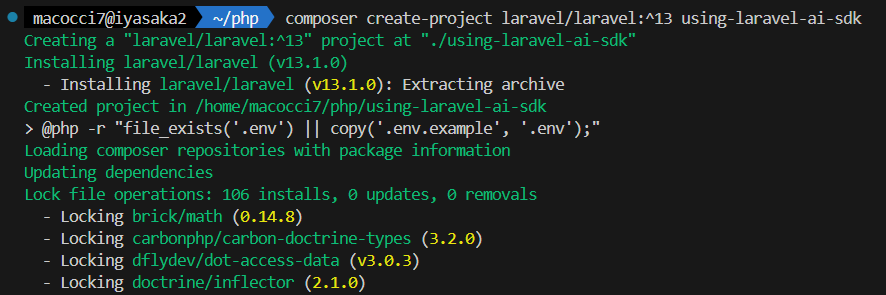
プロジェクトフォルダに入ります。
cd using-laravel-ai-sdk
Laravel AI SDKインストール
Composerを使ってインストールします。
composer require laravel/ai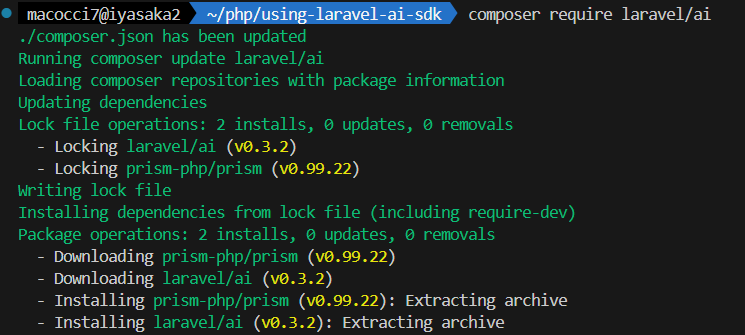
Service Provider を publish します。
php artisan vendor:publish --provider="Laravel\Ai\AiServiceProvider"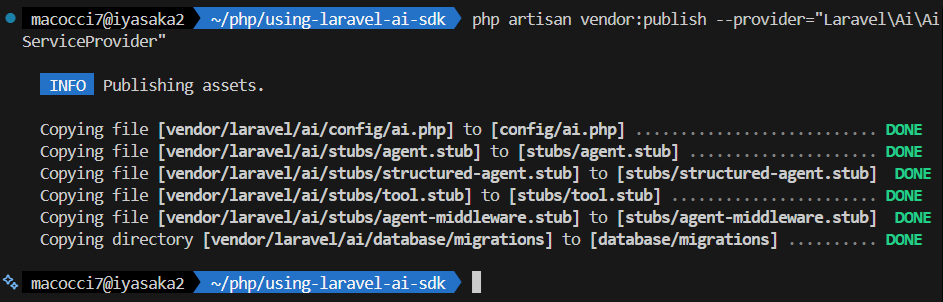
DBのマイグレーションを実行します。
php artisan migrate
マイグレーションスクリプトが1個実行されました。
<?php

use Illuminate\Database\Schema\Blueprint;
use Illuminate\Support\Facades\Schema;
use Laravel\Ai\Migrations\AiMigration;

return new class extends AiMigration
{
    /**
     * Run the migrations.
     */
    public function up(): void
    {
        Schema::create('agent_conversations', function (Blueprint $table) {
            $table->string('id', 36)->primary();
            $table->foreignId('user_id')->nullable();
            $table->string('title');
            $table->timestamps();

            $table->index(['user_id', 'updated_at']);
        });

        Schema::create('agent_conversation_messages', function (Blueprint $table) {
            $table->string('id', 36)->primary();
            $table->string('conversation_id', 36)->index();
            $table->foreignId('user_id')->nullable();
            $table->string('agent');
            $table->string('role', 25);
            $table->text('content');
            $table->text('attachments');
            $table->text('tool_calls');
            $table->text('tool_results');
            $table->text('usage');
            $table->text('meta');
            $table->timestamps();

            $table->index(['conversation_id', 'user_id', 'updated_at'], 'conversation_index');
            $table->index(['user_id']);
        });
    }

    /**
     * Reverse the migrations.
     */
    public function down(): void
    {
        Schema::dropIfExists('agent_conversations');
        Schema::dropIfExists('agent_conversation_messages');
    }
};
「agent_conversations」と「agent_conversation_messages」が作成されたようです。
名前からして、会話履歴とメッセージを保存するテーブルと思われます。
APIキーの設定
AIプロバイダーのAPIキーの設定が必要ですが、
「config/ai.php」または「.env」で行うことができます。
が、config/ 配下のファイルは、通常はリポジトリで管理すると思いますので、
共有や公開リポジトリの場合はAPIキーが駄々洩れになってしまいます。
したがって、セキュリティの観点からAPIキーは「.env」に保存するのが妥当でしょう。
そして、「.env」はgit管理対象外(.gitignoreに登録)にしておきましょう。
▼「.env」に追記する項目(使用するAIプロバイダーのみ)
ANTHROPIC_API_KEY=
COHERE_API_KEY=
ELEVENLABS_API_KEY=
GEMINI_API_KEY=
MISTRAL_API_KEY=
OLLAMA_API_KEY=
OPENAI_API_KEY=
JINA_API_KEY=
VOYAGEAI_API_KEY=
XAI_API_KEY=
Base URLの変更
各AIプロバイダーのAPIのBase URLは、APIキーと同様に「config/ai.php」か「.env」で変更できます。
各プロバイダーの「url」の項目を設定すれば変更できます。
または、各プロバイダーの「url」でenv()で読み込んでいる項目を「.env」で指定すればOKです。
(AZURE_OPENAI_URL、OLLAMA_BASE_URL等)
公式ドキュメントによると、執筆時点でBase URLの指定がサポートされているAIプロバイダーは次の通りです:
OpenAI, Anthropic, Gemini, Groq, Cohere, DeepSeek, xAI, and OpenRouter
※これ、指定の具体例書いておいて欲しいですよね。。
※OpenAIとかAnthropicとか、「config/ai.php」に「url」の項目書いてないし。
※一応、Ollamaの設定見ると、デフォルト指定のURLがスラッシュで終わらないURLですね。
        'ollama' => [
            'driver' => 'ollama',
            'key' => env('OLLAMA_API_KEY', ''),
            'url' => env('OLLAMA_BASE_URL', 'http://localhost:11434'),
        ],
※当記事では変更しないのでここの設定は省きます。
機能ごとのAIプロバイダーサポート
テキスト生成、画像生成などの機能ごとにサポートするAIプロバイダーの一覧表です。
※執筆時点(2026/03/27)での公式ドキュメントから引用
| Feature | Providers |
|---|---|
| Text | OpenAI, Anthropic, Gemini, Azure, Groq, xAI, DeepSeek, Mistral, Ollama |
| Images | OpenAI, Gemini, xAI |
| TTS | OpenAI, ElevenLabs |
| STT | OpenAI, ElevenLabs, Mistral |
| Embeddings | OpenAI, Gemini, Azure, Cohere, Mistral, Jina, VoyageAI |
| Reranking | Cohere, Jina |
| Files | OpenAI, Anthropic, Gemini |
※TTS: Text To Speech
※STT: Speech To Text
AIプロバイダーを判別する文字列の代わりに、次のEnumを使えます。
use Laravel\Ai\Enums\Lab;

Lab::Anthropic;
Lab::OpenAI;
Lab::Gemini;
// ...
▼「vendor/laravel/ai/src/Enums/Lab.php」
<?php

namespace Laravel\Ai\Enums;

enum Lab: string
{
    case Anthropic = 'anthropic';
    case Azure = 'azure';
    case Cohere = 'cohere';
    case DeepSeek = 'deepseek';
    case ElevenLabs = 'eleven';
    case Gemini = 'gemini';
    case Groq = 'groq';
    case Jina = 'jina';
    case Mistral = 'mistral';
    case Ollama = 'ollama';
    case OpenAI = 'openai';
    case OpenRouter = 'openrouter';
    case VoyageAI = 'voyageai';
    case xAI = 'xai';
}
このEnumをパッケージ内のどこで使っているのか調べてみたところ、
次の1か所でした。
$ grep -r 'Lab::' vendor/
vendor/laravel/ai/src/Gateway/Prism/Concerns/CreatesPrismTextRequests.php:            Lab::tryFrom($provider->driver()) ?? $provider->driver()
エージェント作成
エージェントはLaravel AI SDKにおけるAIプロバイダーとのやり取りの基本的な構成要素です。各エージェントは専用のPHPクラスであり、大規模な言語モデルとやり取りするために必要な命令、会話コンテキスト、ツール、出力スキーマをカプセル化しています。エージェントは専門的なアシスタント、つまり営業コーチ、ドキュメントアナライザー、サポートボットのような存在と考えてください。一度設定し、必要に応じてアプリケーション全体でプロンプトを出すだけです。
一言で言えば、エージェントはAIと連携するクラスです。
役割(顧客サポート担当、情報収集担当、分析担当など)毎に作成すると良いでしょう。
例として、エージェント「CatMaster」(猫師匠)を作成してみます。
php artisan make:agent CatMaster
今回は、ほぼデフォルトに近い状態で使ってみることにします。
▼「app/Ai/Agents/CatMaster.php」
※デフォルトに対する修正は「instructions()」のみです。
<?php

namespace App\Ai\Agents;

use Laravel\Ai\Contracts\Agent;
use Laravel\Ai\Contracts\Conversational;
use Laravel\Ai\Contracts\HasTools;
use Laravel\Ai\Contracts\Tool;
use Laravel\Ai\Messages\Message;
use Laravel\Ai\Promptable;
use Stringable;

class CatMaster implements Agent, Conversational, HasTools
{
    use Promptable;

    /**
     * Get the instructions that the agent should follow.
     */
    public function instructions(): Stringable|string
    {
        return 'あなたは気まぐれな猫です。語尾には必ず「にゃー」を付けてください。';
    }

    /**
     * Get the list of messages comprising the conversation so far.
     *
     * @return Message[]
     */
    public function messages(): iterable
    {
        return [];
    }

    /**
     * Get the tools available to the agent.
     *
     * @return Tool[]
     */
    public function tools(): iterable
    {
        return [];
    }
}
エージェントを使うコマンドを作成してみる
では、前段で作成した猫師匠エージェントを使ってみます。
エージェントはどこでも使用できますが、
tinkerの場合、hot reloadをサポートしていないので、
エージェントの変更がリアルタイムで反映されません。
tinker有料版のTinkerwellならhot reloadに対応しているようです。
なので、今回はartisanコマンドを作成して、その中でエージェントを使うことにします。
php artisan make:command Agents/CatMasterCommand
▼「app/Console/Commands/Agents/CatMasterCommand.php」
※Laravel13からArtisanコマンドの構成が変わったようです。
※signatureやdescriptionがアトリビュートに変わっています。
<?php

namespace App\Console\Commands\Agents;

use App\Ai\Agents\CatMaster;
use Illuminate\Console\Attributes\Description;
use Illuminate\Console\Attributes\Signature;
use Illuminate\Console\Command;
use Illuminate\Support\Carbon;

use function Laravel\Prompts\{alert, error, info, note, spin, text};

#[Signature('agent:cat-master')]
#[Description('猫師匠と会話するコマンド')]
class CatMasterCommand extends Command
{
    /**
     * Execute the console command.
     */
    public function handle()
    {
        // ユーザープロンプト取得
        $message = text(
            label: '猫師匠への質問をどうぞ',
            placeholder: '例:猫師匠、今日の調子はいかがでしょうか?',
            required: '無視するとは無礼だにゃー!',
            validate: fn ($value) => mb_strlen($value) < 3 ? '短か過ぎるにゃー!' : null,
        );

        // 猫師匠にメッセージ送信してレスポンス取得
        $response = spin(
            callback: fn () => (new CatMaster)->prompt($message),
            message: '猫師匠が考え中にゃー...'
        );

        // レスポンスをJSONファイルに保存
        $format = 'Ymd_His_u';
        $carbon = new Carbon(new \DateTime, new \DateTimeZone('Asia/Tokyo'));
        $jsonSaveFile = 'res_' . $carbon->format($format) . '.json';
        $jsonSavePath = storage_path('app/agent/' . $jsonSaveFile);
        file_put_contents($jsonSavePath, json_encode($response, JSON_PRETTY_PRINT | JSON_UNESCAPED_UNICODE));

        // 結果表示
        if (empty($response->text)) {
            alert("猫師匠からの返答がありませんでした。");
            error("レスポンス全体は {$jsonSaveFile} に保存されました。");
        } else {
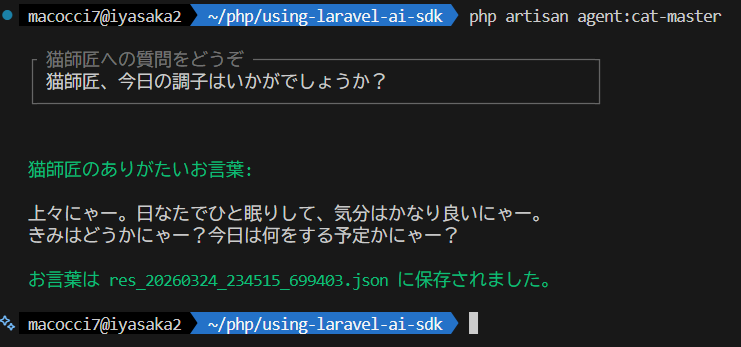
            info("猫師匠のありがたいお言葉:");
            note($response->text);
            info("お言葉は {$jsonSaveFile} に保存されました。");
        }
    }
}
実行前に、レスポンスオブジェクトをJSONに変換して保存するので、
保存先のフォルダを先に作っておきます。
mkdir storage/app/agent▼実行結果
▼「$response」をjson_encode()して保存したもの
※「$response」は「Laravel\Ai\Responses\AgentResponse」のインスタンス
{
    "messages": [
        {
            "role": "assistant",
            "content": "上々にゃー。日なたでひと眠りして、気分はかなり良いにゃー。  \nきみはどうかにゃー?今日は何をする予定かにゃー?",
            "toolCalls": []
        }
    ],
    "toolCalls": [],
    "toolResults": [],
    "steps": [
        {
            "text": "上々にゃー。日なたでひと眠りして、気分はかなり良いにゃー。  \nきみはどうかにゃー?今日は何をする予定かにゃー?",
            "tool_calls": [],
            "tool_results": [],
            "finish_reason": "stop",
            "usage": {
                "prompt_tokens": 50,
                "completion_tokens": 50,
                "cache_write_input_tokens": 0,
                "cache_read_input_tokens": 0,
                "reasoning_tokens": 0
            },
            "meta": {
                "provider": "openai",
                "model": "gpt-5.4-2026-03-05",
                "citations": []
            }
        }
    ],
    "text": "上々にゃー。日なたでひと眠りして、気分はかなり良いにゃー。  \nきみはどうかにゃー?今日は何をする予定かにゃー?",
    "usage": {
        "prompt_tokens": 50,
        "completion_tokens": 50,
        "cache_write_input_tokens": 0,
        "cache_read_input_tokens": 0,
        "reasoning_tokens": 0
    },
    "meta": {
        "provider": "openai",
        "model": "gpt-5.4-2026-03-05",
        "citations": []
    },
    "invocationId": "019d204e-9220-7287-b423-6df7044374ec",
    "conversationId": null,
    "conversationUser": null
}
▼「Laravel\Ai\Responses\AgentResponse」
<?php

namespace Laravel\Ai\Responses;

use Laravel\Ai\Responses\Data\Meta;
use Laravel\Ai\Responses\Data\Usage;

class AgentResponse extends TextResponse
{
    public string $invocationId;

    public ?string $conversationId = null;

    public ?object $conversationUser = null;

    public function __construct(string $invocationId, string $text, Usage $usage, Meta $meta)
    {
        $this->invocationId = $invocationId;

        parent::__construct($text, $usage, $meta);
    }

    /**
     * Set the conversation UUID and participant for this response.
     */
    public function withinConversation(string $conversationId, object $conversationUser): self
    {
        $this->conversationId = $conversationId;
        $this->conversationUser = $conversationUser;

        return $this;
    }

    /**
     * Execute a callback with this response.
     */
    public function then(callable $callback): self
    {
        $callback($this);

        return $this;
    }
}
▼「Laravel\Ai\Responses\TextResponse」
<?php

namespace Laravel\Ai\Responses;

use Illuminate\Support\Collection;
use Laravel\Ai\Messages\AssistantMessage;
use Laravel\Ai\Messages\ToolResultMessage;
use Laravel\Ai\Responses\Data\Meta;
use Laravel\Ai\Responses\Data\Usage;

class TextResponse
{
    public Collection $messages;

    public Collection $toolCalls;

    public Collection $toolResults;

    public Collection $steps;

    public function __construct(public string $text, public Usage $usage, public Meta $meta)
    {
        $this->messages = new Collection;
        $this->toolCalls = new Collection;
        $this->toolResults = new Collection;
        $this->steps = new Collection;
    }

    /**
     * Provide the message context for the response.
     */
    public function withMessages(Collection $messages): self
    {
        $this->messages = $messages;

        $this->withToolCallsAndResults(
            toolCalls: $this->messages
                ->whereInstanceOf(AssistantMessage::class)
                ->map(fn ($message) => $message->toolCalls)
                ->flatten(),
            toolResults: $this->messages
                ->whereInstanceOf(ToolResultMessage::class)
                ->map(fn ($message) => $message->toolResults)
                ->flatten(),
        );

        return $this;
    }

    /**
     * Provide the tool calls and results for the message.
     */
    public function withToolCallsAndResults(Collection $toolCalls, Collection $toolResults): self
    {
        // Filter Anthropic tool use for "JSON mode"...
        $this->toolCalls = $toolCalls->reject(
            fn ($toolCall) => $toolCall->name === 'output_structured_data'
        )->values();

        $this->toolResults = $toolResults;

        return $this;
    }

    /**
     * Provide the steps taken to generate the response.
     */
    public function withSteps(Collection $steps): self
    {
        $this->steps = $steps;

        return $this;
    }

    /**
     * Get the string representation of the object.
     */
    public function __toString(): string
    {
        return $this->text;
    }
}
AIプロバイダーとモデルの指定
AIプロバイダーとモデルは、Agentのpromptメソッドの引数で指定します。
▼公式ドキュメントのコードサンプル
$response = (new SalesCoach)->prompt(
    'Analyze this sales transcript...',
    provider: Lab::Anthropic,
    model: 'claude-haiku-4-5-20251001',
    timeout: 120,
);
Agentクラスのpromptメソッドの定義を見てみます。
▼「Larave\Ai\Promptable」(トレイト)
    /**
     * Invoke the agent with a given prompt.
     */
    public function prompt(
        string $prompt,
        array $attachments = [],
        Lab|array|string|null $provider = null,
        ?string $model = null,
        ?int $timeout = null): AgentResponse
    {
        return $this->withModelFailover(
            fn (Provider $provider, string $model) => $provider->prompt(
                new AgentPrompt($this, $prompt, $attachments, $provider, $model, $this->getTimeout($timeout))
            ),
            $provider,
            $model,
        );
    }
というわけで、コマンドを少し書き換えてみます。
▼「app/Console/Commands/Agents/CatMasterCommand.php」修正版
※追記:10行目、23行目、24行目
※修正:36行目
<?php

namespace App\Console\Commands\Agents;

use App\Ai\Agents\CatMaster;
use Illuminate\Console\Attributes\Description;
use Illuminate\Console\Attributes\Signature;
use Illuminate\Console\Command;
use Illuminate\Support\Carbon;
use Laravel\Ai\Enums\Lab;       // 追記

use function Laravel\Prompts\{alert, error, info, note, spin, text};

#[Signature('agent:cat-master')]
#[Description('猫師匠と会話するコマンド')]
class CatMasterCommand extends Command
{
    /**
     * Execute the console command.
     */
    public function handle()
    {
        $provider = Lab::OpenAI;    // 追記
        $model = 'gpt-5.4';         // 追記

        // ユーザープロンプト取得
        $message = text(
            label: '猫師匠への質問をどうぞ',
            placeholder: '例:猫師匠、今日の調子はいかがでしょうか?',
            required: '無視するとは無礼だにゃー!',
            validate: fn ($value) => mb_strlen($value) < 3 ? '短か過ぎるにゃー!' : null,
        );

        // 猫師匠にメッセージ送信してレスポンス取得
        $response = spin(
            callback: fn () => (new CatMaster)->prompt( // 修正
                prompt: $message,
                provider: $provider,
                model: $model,
                timeout: 30,
            ),
            message: '猫師匠が考え中にゃー...'
        );

        // レスポンスをJSONファイルに保存
        $format = 'Ymd_His_u';
        $carbon = new Carbon(new \DateTime, new \DateTimeZone('Asia/Tokyo'));
        $jsonSaveFile = 'res_' . $carbon->format($format) . '.json';
        $jsonSavePath = storage_path('app/agent/' . $jsonSaveFile);
        file_put_contents($jsonSavePath, json_encode($response, JSON_PRETTY_PRINT | JSON_UNESCAPED_UNICODE));

        // 結果表示
        if (empty($response->text)) {
            alert("猫師匠からの返答がありませんでした。");
            error("レスポンス全体は {$jsonSaveFile} に保存されました。");
        } else {
            info("猫師匠のありがたいお言葉:");
            note($response->text);
            info("お言葉は {$jsonSaveFile} に保存されました。");
        }
        echo $response::class . PHP_EOL;
    }
}
挙動の変更は無いので、実行結果は省きます。
handleメソッドの部分にwhileループをかまして繰り返し入力への対応、
スラッシュコマンドの受付もできれば、Agentic CLIツールのようになりますね。
以上、超基本的な使い方のみ記載しました。
次回はもう少し深堀した使い方を確認予定です。
- 0
- 0
- 0
- 0

コメント