Laravel Newsで紹介されていましたが、SVG画像生成ツール maantje/charts をピュアPHPで使ってみました。

Just a moment...
laravel-news.com
GitHub - maantje/charts: Make SVG charts with PHP
Make SVG charts with PHP. Contribute to maantje/charts development by creating an account on GitHub.
github.com
前提条件
- PHP8.2以降インストール済(8.1でエラー確認済)
- Composerインストール済
- Ubuntu24.04上で作業しています
インストール
まずはプロジェクトフォルダを作成し、中に入ります。
mkdir svg-charts
cd svg-charts
Composerで maantje/charts をインストールします。
composer require maantje/charts
コードサンプルのコピー
パッケージに含まれているコードサンプルをコピーしてみます。
cp -r vendor/maantje/charts/examples ./
中には6つのサンプルコードが入っています。
中に入ってみます。
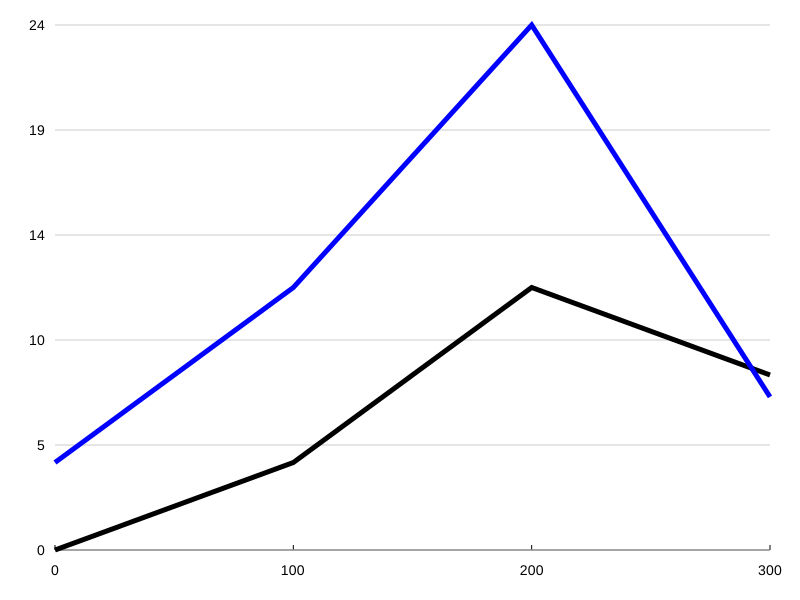
cd examples単純な折れ線グラフの例
<?php

use Maantje\Charts\Chart;
use Maantje\Charts\Line\Line;
use Maantje\Charts\Line\Lines;
use Maantje\Charts\Line\Point;

require '../vendor/autoload.php';

$chart = new Chart(
    series: [
        new Lines(
            lines: [
                new Line(
                    points: [
                        new Point(y: 0, x: 0),
                        new Point(y: 4, x: 100),
                        new Point(y: 12, x: 200),
                        new Point(y: 8, x: 300),
                    ],
                ),
                new Line(
                    points: [
                        new Point(y: 4, x: 0),
                        new Point(y: 12, x: 100),
                        new Point(y: 24, x: 200),
                        new Point(y: 7, x: 300),
                    ],
                    lineColor: 'blue'
                ),
            ]
        ),
    ],
);

echo $chart->render();
実行するとSVGがテキストとして出力されます。
コマンドラインのリダイレクト機能でファイルに保存します。
※コード修正して「file_put_contents()」で保存しても同じです。
php -f simple-line-chart.php > output/simple-line-chart.svg
次のようなSVG画像が生成されます。
単純な棒グラフの例
<?php

require '../vendor/autoload.php';

use Maantje\Charts\Bar\Bar;
use Maantje\Charts\Bar\Bars;
use Maantje\Charts\Chart;

$chart = new Chart(
    series: [
        new Bars(
            bars: [
                new Bar(
                    name: 'Jan',
                    value: 222301,
                ),
                new Bar(
                    name: 'Feb',
                    value: 189242,
                ),
                new Bar(
                    name: 'March',
                    value: 144922,
                ),
            ],
        ),
    ],
);

echo $chart->render();
▼実行結果

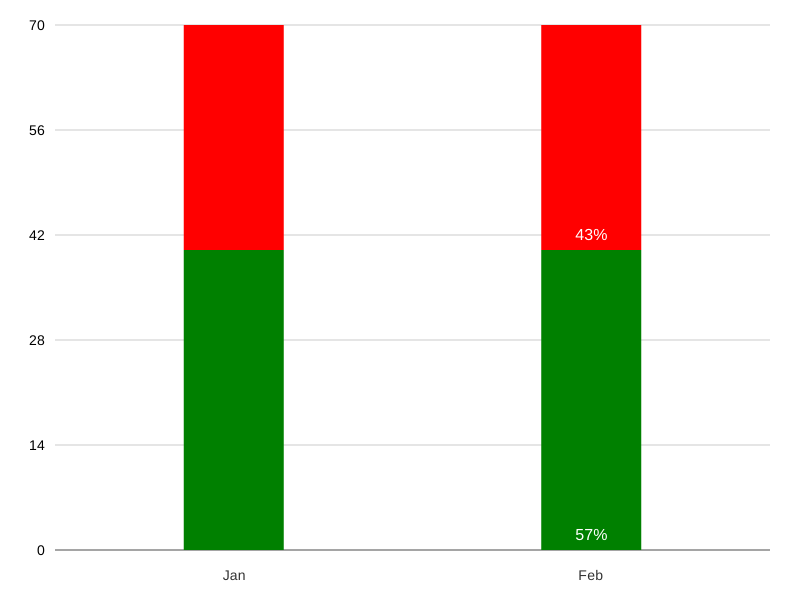
単純な積み上げ棒グラフの例
▼「simple-stacked-bar-chart.php」
<?php

require '../vendor/autoload.php';

use Maantje\Charts\Bar\Bars;
use Maantje\Charts\Bar\Segment;
use Maantje\Charts\Bar\StackedBar;
use Maantje\Charts\Chart;

$chart = new Chart(
    series: [
        new Bars(
            bars: [
                new StackedBar(
                    name: 'Jan',
                    segments: [
                        new Segment(
                            value: 40,
                            color: 'green',
                            labelColor: 'white',
                        ),
                        new Segment(
                            value: 30,
                            color: 'red',
                            labelColor: 'white',
                        ),
                    ],
                ),
                new StackedBar(
                    name: 'Feb',
                    segments: [
                        new Segment(
                            value: 40,
                            color: 'green',
                            labelColor: 'white',
                        ),
                        new Segment(
                            value: 30,
                            color: 'red',
                            labelColor: 'white',
                        ),
                    ],
                    percentage: true,
                ),
            ],
        ),
    ],
);

echo $chart->render();
▼実行結果
高度な折れ線グラフの例
<?php

use Maantje\Charts\Annotations\PointAnnotation;
use Maantje\Charts\Annotations\XAxis\XAxisLineAnnotation;
use Maantje\Charts\Annotations\XAxis\XAxisRangeAnnotation;
use Maantje\Charts\Annotations\YAxis\YAxisLineAnnotation;
use Maantje\Charts\Annotations\YAxis\YAxisRangeAnnotation;
use Maantje\Charts\Chart;
use Maantje\Charts\Formatter;
use Maantje\Charts\Line\Line;
use Maantje\Charts\Line\Lines;
use Maantje\Charts\Line\Point;
use Maantje\Charts\XAxis;
use Maantje\Charts\YAxis;

require '../vendor/autoload.php';

$chart = new Chart(
    yAxis: [
        new YAxis(
            name: 'celsius',
            title: 'Temperature',
            color: 'red',
            minValue: 30,
            maxValue: 50,
            annotations: [
                new YAxisLineAnnotation(
                    y: 48,
                    yAxis: 'celsius',
                    color: 'red',
                    size: 3,
                    dash: '20,20',
                    label: 'Critical Hot',
                    textLeftMargin: 3
                ),
                new YAxisRangeAnnotation(
                    y1: 39,
                    y2: 48,
                    yAxis: 'celsius',
                    color: 'red',
                    label: 'Too hot',
                ),
                new YAxisRangeAnnotation(
                    y1: 36,
                    y2: 39,
                    yAxis: 'celsius',
                    color: 'green',
                    label: 'Ideal',
                ),
                new YAxisRangeAnnotation(
                    y1: 36,
                    y2: 32,
                    yAxis: 'celsius',
                    color: 'blue',
                    label: 'Too cold',
                ),
                new YAxisLineAnnotation(
                    y: 32,
                    yAxis: 'celsius',
                    color: 'blue',
                    size: 3,
                    dash: '20,20',
                    label: 'Critical Cold',
                    textLeftMargin: 3
                ),
            ],
        ),
        new YAxis(
            name: 'elevation',
            title: 'Elevation',
            minValue: 0,
            maxValue: 3000,
            labelMargin: 10,
            annotations: [
                new PointAnnotation(
                    x: 1725331334 + 3600,
                    y: 2000,
                    markerSize: 10,
                    markerBackgroundColor: 'white',
                    markerBorderColor: 'red',
                    markerBorderWidth: 4,
                    label: 'Point annotation',
                ),
            ],
            formatter: Formatter::template(':value m')

        ),
    ],
    xAxis: new XAxis(
        title: 'Time',
        annotations: [
            new XAxisLineAnnotation(
                x: 1725331334 + 3600 + 1800,
                color: 'green',
                label: 'Halfway',
                textLeftMargin: -2
            ),
            new XAxisRangeAnnotation(
                x1: 1725331334 + 3600 + 3600,
                x2: 1725331334 + 3600 + 3600 + 3600,
                color: 'blue',
                label: 'Last hour',
            ),
        ],
        formatter: Formatter::timestamp(),
    ),
    series: [
        new Lines(
            lines: [
                new Line(
                    [
                        new Point(y: 37.3, x: 1725331334),
                        new Point(y: 37.8, x: 1725331334 + 3600),
                        new Point(y: 38, x: 1725331334 + 3600 + 3600),
                        new Point(y: 42.2, x: 1725331334 + 3600 + 3600 + 3600),
                    ],
                    yAxis: 'celsius',
                    lineColor: '#FF0000',
                ),
                new Line(
                    [
                        new Point(y: 0, x: 1725331334),
                        new Point(y: 900, x: 1725331334 + 3600),
                        new Point(y: 1800, x: 1725331334 + 3600 + 3600),
                        new Point(y: 2200, x: 1725331334 + 3600 + 3600 + 3600),
                    ],
                    yAxis: 'elevation',
                ),
            ]
        ),
    ],
);

echo $chart->render();
▼実行結果

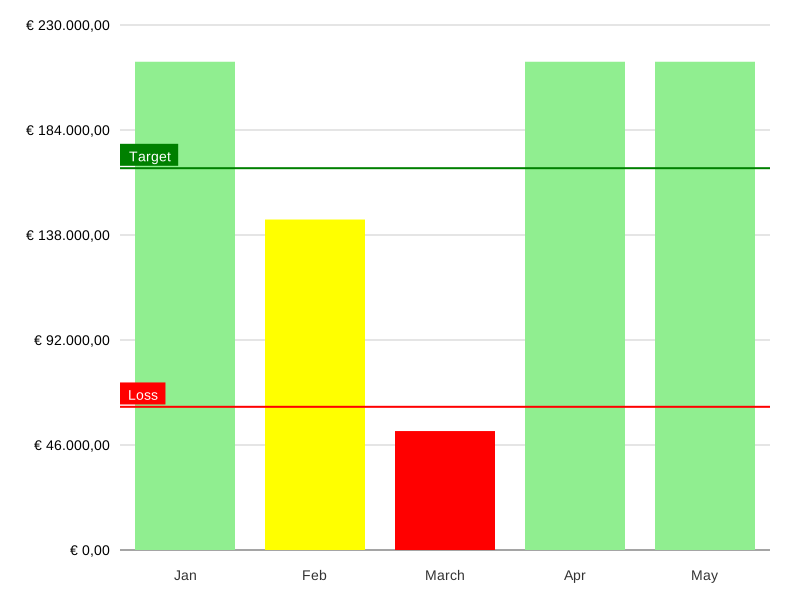
高度な棒グラフの例
<?php

require '../vendor/autoload.php';

use Maantje\Charts\Annotations\YAxis\YAxisLineAnnotation;
use Maantje\Charts\Bar\Bar;
use Maantje\Charts\Bar\Bars;
use Maantje\Charts\Chart;
use Maantje\Charts\Formatter;
use Maantje\Charts\YAxis;

$chart = new Chart(
    yAxis: new YAxis(
        minValue: 120000,
        maxValue: 230000,
        annotations: [
            new YAxisLineAnnotation(
                y: 200000,
                color: 'green',
                label: 'Target',
                textLeftMargin: -1
            ),
            new YAxisLineAnnotation(
                y: 150000,
                color: 'red',
                label: 'Loss',
                textLeftMargin: -2
            ),
        ],
        formatter: Formatter::currency('nl_NL', 'EUR')
    ),
    series: [
        new Bars(
            bars: [
                new Bar(
                    name: 'Jan',
                    value: 222301,
                    color: 'lightgreen'
                ),
                new Bar(
                    name: 'Feb',
                    value: 189242,
                    color: 'yellow',
                ),
                new Bar(
                    name: 'March',
                    value: 144922,
                    color: 'red'
                ),
                new Bar(
                    name: 'Apr',
                    value: 222301,
                    color: 'lightgreen'
                ),
                new Bar(
                    name: 'May',
                    value: 222301,
                    color: 'lightgreen'
                ),
            ],
        ),
    ],
);

echo $chart->render();
▼実行結果
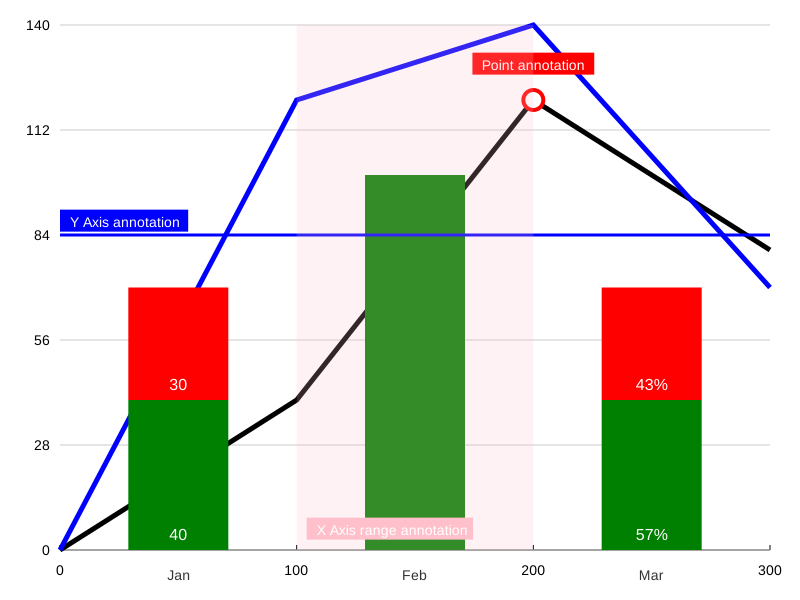
混合グラフの例
<?php

require '../vendor/autoload.php';

use Maantje\Charts\Annotations\PointAnnotation;
use Maantje\Charts\Annotations\XAxis\XAxisRangeAnnotation;
use Maantje\Charts\Annotations\YAxis\YAxisLineAnnotation;
use Maantje\Charts\Bar\Bar;
use Maantje\Charts\Bar\Bars;
use Maantje\Charts\Bar\Segment;
use Maantje\Charts\Bar\StackedBar;
use Maantje\Charts\Chart;
use Maantje\Charts\Line\Line;
use Maantje\Charts\Line\Lines;
use Maantje\Charts\Line\Point;
use Maantje\Charts\XAxis;
use Maantje\Charts\YAxis;

$chart = new Chart(
    yAxis: new YAxis(
        annotations: [
            new PointAnnotation(
                x: 200,
                y: 120,
                markerSize: 10,
                markerBackgroundColor: 'white',
                markerBorderColor: 'red',
                markerBorderWidth: 4,
                label: 'Point annotation',
            ),
            new YAxisLineAnnotation(
                y: 84,
                color: 'blue',
                size: 3,
                label: 'Y Axis annotation',
                labelColor: 'white',
            ),
        ]
    ),
    xAxis: new XAxis(
        annotations: [
            new XAxisRangeAnnotation(
                x1: 100,
                x2: 200,
                color: 'pink',
                label: 'X Axis range annotation'
            ),
        ]
    ),
    series: [
        new Lines(
            lines: [
                new Line(
                    points: [
                        new Point(y: 0, x: 0),
                        new Point(y: 40, x: 100),
                        new Point(y: 120, x: 200),
                        new Point(y: 80, x: 300),
                    ],
                ),
                new Line(
                    points: [
                        new Point(y: 0, x: 0),
                        new Point(y: 120, x: 100),
                        new Point(y: 140, x: 200),
                        new Point(y: 70, x: 300),
                    ],
                    lineColor: 'blue'
                ),
            ]
        ),
        new Bars(
            bars: [
                new StackedBar(
                    name: 'Jan',
                    segments: [
                        new Segment(
                            value: 40,
                            color: 'green',
                            labelColor: 'white',
                        ),
                        new Segment(
                            value: 30,
                            color: 'red',
                            labelColor: 'white',
                        ),
                    ],
                    formatter: fn (float $value) => number_format($value),
                ),
                new Bar(
                    name: 'Feb',
                    value: 100,
                    color: 'green'
                ),
                new StackedBar(
                    name: 'Mar',
                    segments: [
                        new Segment(
                            value: 40,
                            color: 'green',
                            labelColor: 'white',
                        ),
                        new Segment(
                            value: 30,
                            color: 'red',
                            labelColor: 'white',
                        ),
                    ],
                    percentage: true,
                ),
            ],
        ),
    ],
);

echo $chart->render();
▼実行結果
以上です。
- 0
- 0
- 0
- 0


コメント