
LaravelプロジェクトにTailwind CSSを手動で追加する手順の解説です。
※2025/04/03追記:インストールと設定の仕方が変わりました。次の記事をご覧ください。

※以下、古い内容になります。

Laravel - The PHP Framework For Web Artisans
Laravel is a PHP web application framework with expressive, elegant syntax. We???ve already laid the foundation ??? free...
laravel.com
Install Tailwind CSS with Laravel
Setting up Tailwind CSS in a Laravel project.
tailwindcss.com
前提条件
- Laravel11を使っていきます
- PHP8.2以降インストール済(Laravel11の対応バージョン)
- Composerインストール済
- Ubuntu上で作業していきます
新規プロジェクト作成
新規プロジェクト「tailwindcss-app」を作成します。
composer create-project laravel/laravel:^11 tailwindcss-app
プロジェクトフォルダに入ります。
cd tailwindcss-appTailwind CSS インストール
npmを使ってTailwind CSSと依存関係をインストールします。
npm install -D tailwindcss postcss autoprefixer
初期化コマンドで設定ファイルを設置します。
npx tailwindcss init -p
※「tailwind.config.js」と「postcss.config.js」が設置されます。
▼「tailwind.confg.js」の初期状態
/** @type {import('tailwindcss').Config} */
export default {
  content: [],
  theme: {
    extend: {},
  },
  plugins: [],
}
▼「postcss.config.js」の初期状態
export default {
  plugins: {
    tailwindcss: {},
    autoprefixer: {},
  },
}
設定ファイル編集
▼「tailwind.config.js」を編集します。
/** @type {import('tailwindcss').Config} */
export default {
  content: [
    "./resources/**/*.blade.php",
    "./resources/**/*.js",
    "./resources/**/*.vue",
  ],
  theme: {
    extend: {},
  },
  plugins: [],
}
CSSへのレイヤー追加
▼「resources/css/app.css」を編集します。
@tailwind base;
@tailwind components;
@tailwind utilities;
ルートテンプレート作成
▼「resources/views/layouts/app.blade.php」を新規作成します。
※HTMLヘッダー部でTailwindCSSを適用させます
<!doctype html>
<html>
<head>
  <meta charset="utf-8">
  <meta name="viewport" content="width=device-width, initial-scale=1.0">
  @vite('resources/css/app.css')
</head>
<body class="bg-gray-200">
    <div id="app">
        <main class="py-4">
            @yield('content')
        </main>
    </div>
</body>
</html>
ページテンプレート編集
▼「resources/views/welcome.blade.php」を編集します
@extends('layouts.app')

<div>
    <h1
        class="m-2 px-4 py-2 font-bold text-4xl text-white bg-indigo-800"
    >
        Welcome!
    </h1>
    <div
        class="w-11/12 m-4 p-2 bg-white rounded-lg"
    >
        <p
            class="m-4 text-xl text-blue-800 font-bold"
        >
            Hello!
        </p>
        <p>
            <a
                href="https://tailwindcss.com/docs/guides/laravel"
                class="m-4 text-blue-500 hover:text-orange-500"
            >
                Tailwind CSS
            </a>
        </p>
    </div>
</div>
ビルトインサーバー起動
Laravelのビルトインサーバーを起動します。
php artisan serve
Viteを起動します。
npm run dev
ブラウザで確認
WEBブラウザで http://localhost:8000/ にアクセスします。
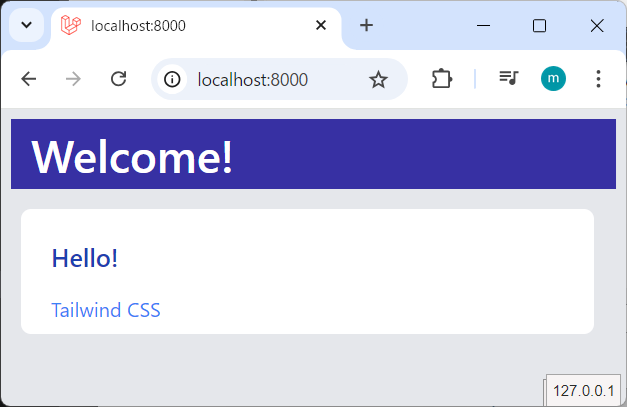
Tailwind CSS が適用された状態でページが表示されました。
以上です。
- 0
- 0
- 0
- 0



コメント