Laravel Newsで紹介されていましたが、Laravelのconfig()やConfigの参照が存在しているかをチェックするサードパーティパッケージ chrisdicarlo/laravel-config-checker を使ってみました。

Just a moment...
laravel-news.com
GitHub - chrisdicarlo/laravel-config-checker: Checks if configuration values exist by scanning for usage in the codebase.
Checks if configuration values exist by scanning for usage in the codebase. - chrisdicarlo/laravel-config-checker
github.com
前提条件
- Laravel11を使っていきます
- PHP8.2以降インストール済(Laravel11の対応バージョン)
- Composerインストール済
- Ubuntu上で作業していきます
プロジェクト作成
まずは新規プロジェクト「config-cheker」を作成します。
composer create-project laravel/laravel:^11 config-checker
Laravel Config Checker インストール
プロジェクトフォルダに入ってから Laravel Config Checker をインストールします。
cd config-checker
composer require chrisdicarlo/laravel-config-checker
Laravel Config Checker 実行
次のコマンドでチェックを実行します。
php artisan config:check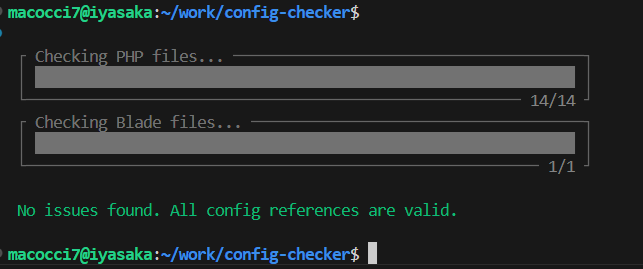
プロジェクト作成直後は config() の参照切れがないのでエラーは出ません。
では、適当に存在しない参照を適用してみます。
▼「app/Console/Commands/HogeCommand.php」
<?php

namespace App\Console\Commands;

use Illuminate\Console\Command;
use Illuminate\Support\Facades\Config;

class HogeCommand extends Command
{
    /**
     * The name and signature of the console command.
     *
     * @var string
     */
    protected $signature = 'hoge:run';

    /**
     * The console command description.
     *
     * @var string
     */
    protected $description = 'Hoge Command';

    /**
     * Execute the console command.
     */
    public function handle()
    {
        $name = config('hoge.name');
        $email = Config::get('hoge.email');
        echo "{$name} <{$email}>" . PHP_EOL;
    }
}
この Artisan コマンドは存在しない config を参照しているので
実行すると、次のように値は表示されません。

では、この状態で config:check を実行してみます。

エラーとして、ファイルパス、行番号、参照キー、参照方法が出力されました。
※ v1.0.1 では、インストール時に Internal Server Error を引き起こすバグがありましたが、v1.0.2 (2024/09/27リリース) で解消されています。
以上です。
- 0
- 0
- 0
- 0


コメント